
Call API
Overview
Call API makes HTTP requests to external APIs and web services, and stores the response so the rest of your flow can use it.
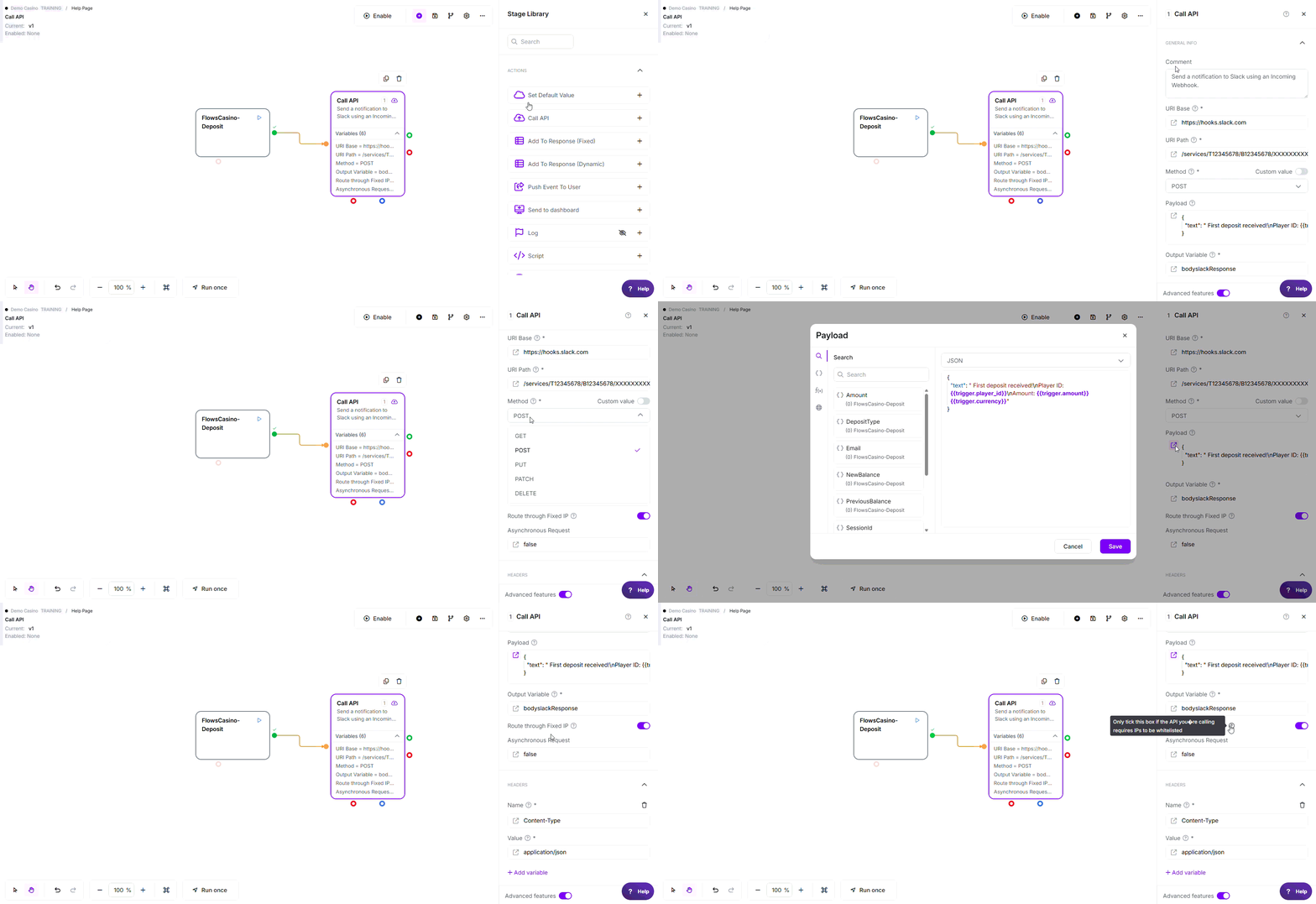
Note: The variable names, values, criteria, and configuration used in this example are for demonstration purposes only.
Where to find it: Actions in the stage library.
When to Use
- Connect to third-party services (Slack, Salesforce, Stripe, and so on)
- Fetch data from external databases or systems
- Send notifications or updates to external platforms
- Trigger actions in other applications
- Retrieve real-time information from web services
- Submit data to webhooks or API endpoints
- Integrate with custom-built APIs
Building Apps
Call API is the foundation for building apps on Flows. Apps are pre-built flows that users install and use directly as a single stage in their own flows, after providing their own credentials.
- Apps package an API integration into a reusable stage
- Users install an app and enter their own credentials (API keys, tokens, and so on)
- Once installed, the app appears as a stage in the user's flow builder
- Apps hide the API details, so anyone can use the integration without configuring it from scratch
Configuration
Fields Reference
| Field | Required | Description | Example |
|---|---|---|---|
| URI Base | Yes | Base path of the API endpoint; must include the protocol | https://api.slack.com/ |
| URI Path | Yes | The specific endpoint path after the base URL; no leading slash | api/chat.postMessage |
| Method | Yes | HTTP method: GET, POST, PUT, PATCH, or DELETE | POST |
| Output Variable | Yes | Variable name to store the response in (defaults to body) | apiResponse, userData |
| Payload | No | Request body for POST, PUT, or PATCH requests | {"key": "{{value}}"} |
| Headers | No | HTTP headers such as Authorization or Content-Type | Authorization: Bearer {{token}} |
| Route through Fixed IP | No | Turn on if the API requires IP whitelisting (off by default) | On / Off |
| Asynchronous Request | No | Send the request without waiting for a response (off by default) | On / Off |
Using functions in these fields: Any value field above accepts @ functions, for example @NowSecond for the current time or @calc(...) for a calculation.
See Flows Functions for the full list.
Exit Points
| Exit | When | Response Data |
|---|---|---|
| Pass | API call returned a success status in the 200–208 range (200, 201, 204, and so on) | ✓ Stored in the output variable |
| Fail | API returned any other status code: a 3xx redirect, or a 4xx or 5xx error | ✓ Still stored, so you can inspect and handle it |
| Error | Network error, unreachable endpoint, invalid URL, or a timeout | ✗ No response available |
About the timeout: a request that runs past the limit (10 seconds normally, 2 seconds when Asynchronous Request is on) takes the Error exit. If the builder shows a separate Timeout dot on this stage, it is not used, connect and handle the Error exit to catch timeouts.
About redirects: a 3xx redirect is not followed automatically. Because a redirect status is not in the 200–208 success range, the call takes the Fail exit. Point your request at the final URL directly rather than relying on a redirect.
How It Works
When executed, the stage:
- Builds the URL - Combines URI Base and URI Path, handling the slash between them automatically
- Prepares headers - Adds default headers when needed, then applies your custom headers
- Sends the request - Uses the method, headers, and payload you configured
- Reads the response - Decompresses it if the API sent a compressed response (Gzip and Brotli are supported)
- Parses the response - Converts JSON and XML into variables automatically; anything else is stored as raw text
- Routes to an exit - Pass for a 200–208 success, Fail for any other status code (3xx, 4xx, 5xx), Error for a network problem or a timeout
Response Format
The response is parsed automatically and stored in your output variable.
| Response Type | What Happens | Access It With |
|---|---|---|
| JSON (most common) | Parsed into nested variables automatically | {{variable}}.field.subfield, arrays by index: {{variable}}.items.0.name |
| XML | Detected when the response starts with <, converted to the same format as JSON | {{variable}}.field.subfield |
| Plain text / other | Stored as raw text; useful for CSV, HTML, or anything that isn't JSON or XML | {{variable}}.NonJSON |
Always available: {{variable}}.responseCode (HTTP status code) and {{variable}}.responseMessage (status message, present on error responses).
Common Use Cases
1. Send a Slack Message
- URI Base:
https://slack.com/ - URI Path:
api/chat.postMessage - Method: POST
- Headers:
Authorization: Bearer {{slackToken}} - Payload:
{"channel": "C1234567890", "text": "Hello from Flows!"}
2. Fetch User Data
- URI Base:
https://api.example.com/ - URI Path:
v1/users/{{userId}} - Method: GET
- Headers:
X-API-Key: {{apiKey}}
3. Update a Record
- URI Base:
https://crm.example.com/ - URI Path:
api/customers/{{customerId}} - Method: PATCH
- Payload:
{"status": "active", "lastContact": "{{currentDate}}"}
Key Behaviors
| Feature | Behavior |
|---|---|
| Timeout | 10 seconds for a normal request, 2 seconds if Asynchronous Request is on; a timeout takes the Error exit |
| Compression | ✓ Gzip and Brotli supported; ✗ Deflate is not supported |
| Redirects | ✗ Not followed; a 3xx redirect takes the Fail exit. Call the final URL directly |
| SSL/TLS | ✓ Standard certificates work automatically; ✗ Self-signed certificates fail |
| Retries | ✗ No automatic retries; add Route Flow and Loop stages if you need them |
| Response Headers | ✗ Not included in the output; only the body and status metadata are stored |
Do's and Don'ts
Do:
- ✓ Connect Pass, Fail, and Error so every outcome is handled (a timeout arrives on the Error exit)
- ✓ Use a meaningful Output Variable name, like
userDatainstead ofbody - ✓ Store tokens and API keys in variables, never hardcoded
- ✓ Set Content-Type when sending a payload (usually
application/json) - ✓ Test with a small payload before sending real data
- ✓ Turn on Route through Fixed IP only when the API requires whitelisting
Don't:
- ✗ Leave a trailing slash on URI Base and a leading slash on URI Path at the same time
- ✗ Forget authentication headers; this causes 401 or 403 errors
- ✗ Send a payload with a GET request; use variables in the URI Path instead
- ✗ Skip handling the Fail exit; 4xx and 5xx errors still need a path
- ✗ Assume every call succeeds; connect Error and Timeout too
Troubleshooting
| Issue | Common Cause | Fix |
|---|---|---|
| Double slash in the URL | URI Base ends with / and URI Path also starts with / | Remove the leading slash from URI Path |
| 401 or 403 errors | Missing or incorrect authentication header | Add the required header, such as Authorization or an API key |
| API rejects the request | Content-Type doesn't match the payload format | Set Content-Type to match your payload (usually application/json) |
| GET request fails with a body | The API rejects GET requests that include a payload | Move the data into the URI Path as variables instead |
| Flow stops after the API call | The Fail exit isn't connected | Connect Fail to handle 4xx and 5xx responses |
| Variable not replaced in the URL or payload | Incorrect variable syntax | Use {{variableName}} for every variable reference |
| Connection timeout | API endpoint is slow or unreachable | Check the URI Base, verify connectivity, and connect the Error exit (timeouts take the Error path) |
| Rate limit errors (429) | Too many requests sent to the API | Add delay stages between calls, and handle it on the Fail exit |
Edge Cases
- Empty responses (204 No Content): Handled without error;
{{variable}}.responseCodeis 204 and no body is stored - Deflate compression: Not supported; use an API that returns Gzip, Brotli, or plain text instead
- Asynchronous mode: Sends the request in the background and doesn't wait for or return a response; errors are logged but don't stop the flow
- Large responses: No fixed size limit, but very large payloads can slow down your flow
Related Stages
- Fetch Data: Retrieve stored data from flow storage instead of external APIs
- Save Data: Store API responses for later use
- Route Flow: Make decisions based on API response values
- Change Data: Transform API response data before using it
- Loop: Process multiple API calls for array data