
Set Default Value
Overview
Set Default assigns values to variables only if they don't already exist or are empty in the flow dictionary. Unlike Change Data which always overwrites, this stage conditionally assigns values, making it ideal for providing fallback values or initializing optional parameters.
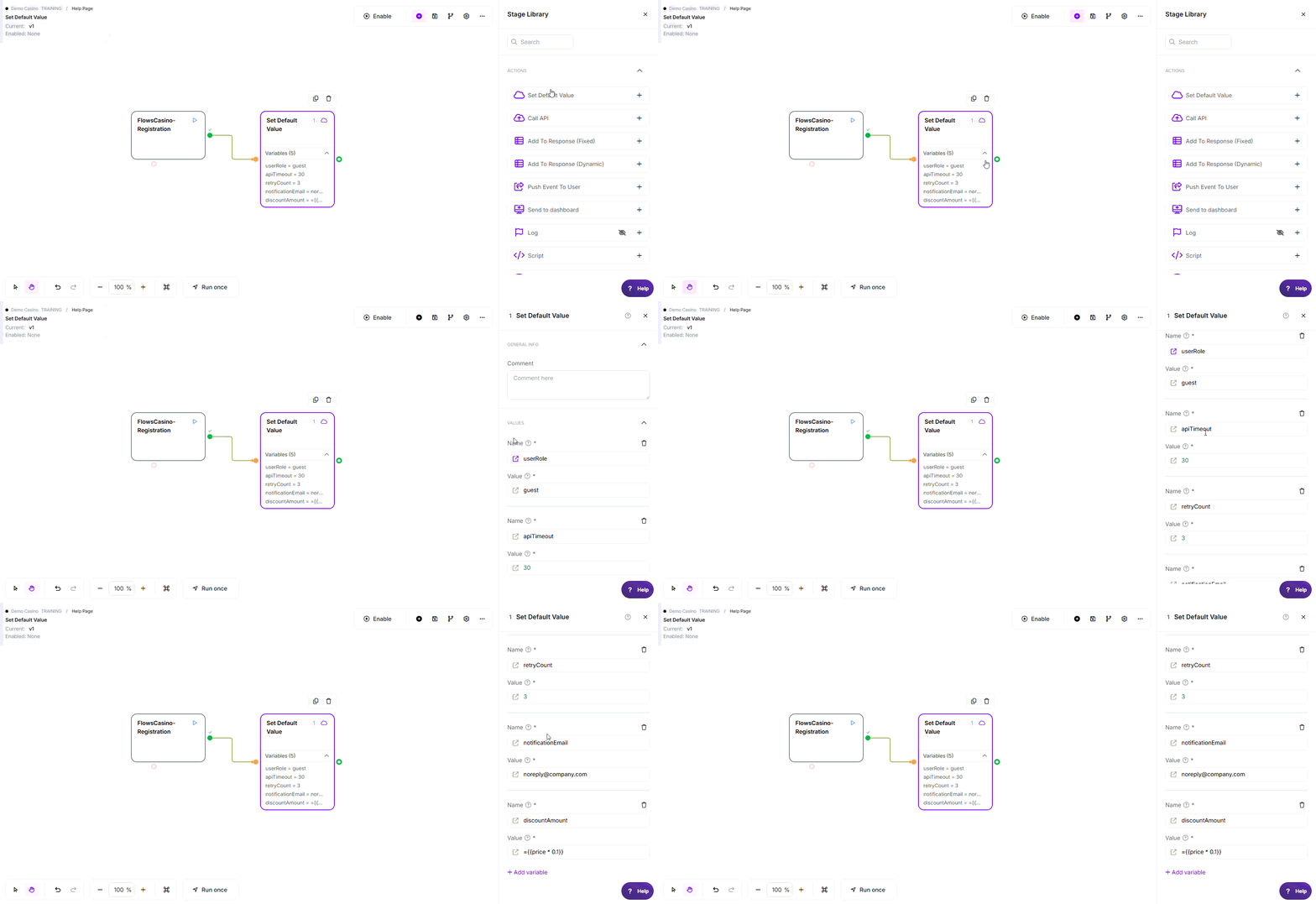
Note: The variable names, values, criteria, and configuration used in this example are for demonstration purposes only.
Where to find it: Actions in the stage library.
Configuration
Required Fields
| Field | Description | Example |
|---|---|---|
| Values | One or more key-value pairs to set (at least one required) | Variable: userRole, Default: guest |
Each value pair consists of:
| Sub-field | Description | Example |
|---|---|---|
| Variable Name | Name of variable to create (without brackets) | apiTimeout, retryCount |
| Default Value | Value to assign if variable doesn't exist or is empty | 30, guest, ={{baseValue}} * 2 |
Only the Variable Name is required. The Default Value can be left blank. If you leave it blank, a missing or empty variable is set to an empty value (the stage does not stop you from doing this).
Formulas: a Default Value starting with = is calculated (arithmetic and math functions only, no IF or conditional logic). Wrap each variable in braces and keep the math outside the braces: ={{price}} * 0.1 is correct; ={{price * 0.1}} does not work.
Using functions in these fields: Any value field above accepts @ functions, for example @NowSecond for the current time or @calc(...) for a calculation. See Flows Functions for the full list.
Exit Points
| Exit | When | Flow Direction |
|---|---|---|
| Pass | Always (all default values processed) | ✓ Variables created where needed, skipped where already exist |
How It Works
When executed, Set Default:
- Processes each variable pair - Iterates through all configured variables
- Checks if variable exists - Looks for variable in flow dictionary
- Checks if value is empty - Tests if existing value is empty string (after trim)
- Assigns default conditionally - Only sets value if variable missing or empty
- Preserves existing values - Skips assignment if variable exists with non-empty value
Key Difference from Change Data: Set Default only assigns when variable is missing or empty; Change Data always overwrites.
Common Use Cases
1. API Timeout Default
- Variable:
apiTimeout - Default Value:
30 - Result: If apiTimeout doesn't exist → created with value 30; If already 60 → stays 60
2. User Role Default
- Variable:
userRole - Default Value:
guest - Result: If userRole missing or empty → becomes "guest"; If already "admin" → stays "admin"
3. Multiple Defaults
- Variable 1:
retryCount=3 - Variable 2:
maxRetries=5 - Variable 3:
delayMs=1000 - Result: Initialize several optional parameters at once
4. Optional Webhook Fields
- Variable:
notificationEmail - Default Value:
[email protected] - Result: Provide fallback email if webhook doesn't include one
5. Formula-Based Defaults
- Variable:
discountAmount - Default Value:
={{price}} * 0.1 - Result: Calculate default 10% discount if not specified
Key Behaviors
| Feature | Behavior |
|---|---|
| Conditional Assignment | Only sets value if variable missing or empty |
| Empty String Handling | Empty strings (after trim) treated as "not existing" |
| Formula Support | ✓ Default values starting with = are evaluated as formulas |
| Variable References | ✓ Can reference other variables: {{defaultConfig}} |
| Multiple Variables | Can set any number of defaults in single stage |
| Always Succeeds | No Error exit; always routes to Pass |
Best Practices
- ✓ Use for optional API parameters or webhook fields
- ✓ Initialize variables that may not be present from earlier stages
- ✓ Place early in flow to ensure variables exist before use
- ✓ Use meaningful defaults that make sense for your use case
- ✓ Document why each default value was chosen
- ✓ Combine multiple related defaults in single stage
- ✓ Use formulas for calculated defaults:
={{baseValue}} * 2(keep math outside the braces)
Common Mistakes
| Mistake | Symptom | Fix |
|---|---|---|
| Expecting to overwrite existing values | Existing values not changed | Use Change Data instead to always overwrite; Set Default preserves existing |
| Empty strings not replaced | Empty values remain empty | Set Default DOES replace empty strings; verify configuration |
| Using with curly braces in variable name | Variable not created correctly | Enter plain name: "apiTimeout" not "{{apiTimeout}}" |
| Formula not evaluating | Literal formula text stored | Ensure formula starts with = sign: ={{value}} |
| Assuming values are required | Confusion about stage purpose | Set Default is for optional fields; use validation for required fields |
Troubleshooting
| Issue | Exit/Result | Common Cause | Fix |
|---|---|---|---|
| Default not applied | Pass | Variable already exists with non-empty value | This is expected behavior; use Change Data to overwrite |
| Empty value not replaced | Pass | Value has whitespace (not truly empty) | Set Default trims before checking; verify actual value |
| Variable not created | Pass | Variable name field empty or invalid | Ensure variable name is provided and valid |
| Formula produces wrong result | Pass | Referenced variables don't exist or formula incorrect | Verify all referenced variables exist before Set Default stage |
Edge Cases
- Variable exists with non-empty value: Default not applied; existing value preserved
- Variable exists with empty value: Default IS applied; empty replaced with default
- Variable doesn't exist: Default applied; variable created
- Formula evaluation errors: Handled at variable resolution level
- Multiple variables with same name: Last one wins (not recommended)
Related Stages
- Change Data: Always overwrites values (vs conditional assignment)
- Look Up Value: Use after Set Default to map default values
- Route Flow: Check if variables were set or used defaults