
Increment Number
Overview
Increment Number safely increments numeric values in persistent storage, ensuring atomic operations to prevent race conditions during concurrent access. This stage is designed specifically for counters and numeric values that need reliable, concurrent updates.
Use this stage when you need to maintain running counters, track totals across multiple flow executions, or implement any numeric aggregation where concurrent access is possible.
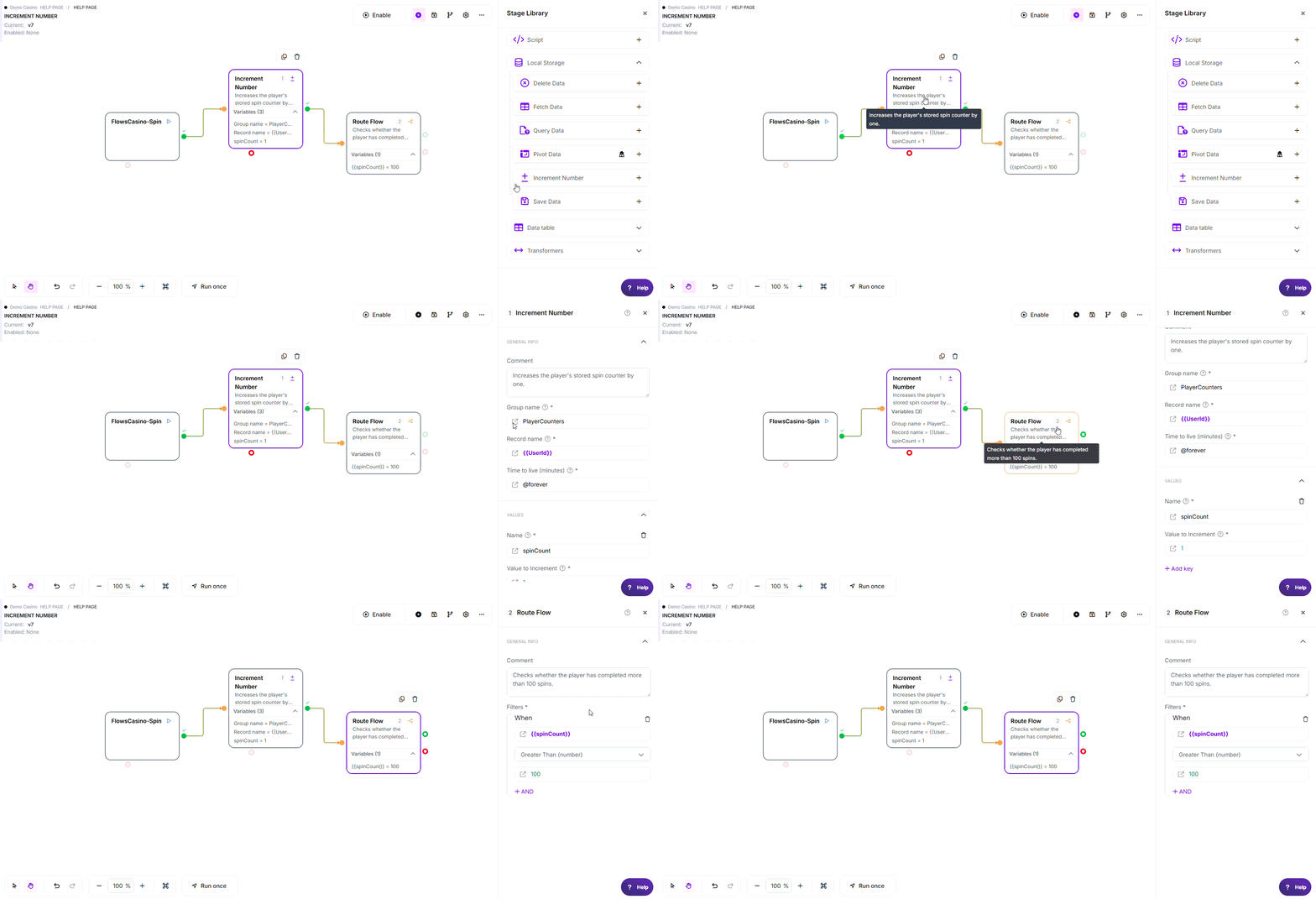
* Example flow demonstrating how Increment Number maintains a persistent spin counter for each player and immediately uses the updated value to determine whether the player has completed more than 100 spins.
Note: The variable names, values, criteria, and configuration used in this example are for demonstration purposes only.
Where to find it: Actions > Local Storage in the stage library.
Configuration
Required Fields
| Field | Description | Example |
|---|---|---|
| Group name | The organizational namespace for your counter data | counters, orderSequence |
| Key (Name) | The identifier for the counter to increment | orderCount, totalRevenue |
| Value to Increment | The amount to add to the counter (can be positive or negative). The value is always treated as a number; there is no decimal formatter, so a fractional result may display differently than you expect | 1, {{itemPrice}}, -5 |
Optional Fields
- Record name: A sub-grouping within the group name for hierarchical organization (e.g., date-based records)
- Time to live (minutes): How long to keep the counter before automatic deletion. Use
@foreverfor permanent counters,@1_hour(60 min),@24_hours(1440 min), or a specific number of minutes. Note: entering0or a negative number means immediate expiry, NOT forever (this differs from Save Data). Use@foreveror leave it empty to keep the counter indefinitely.
Using functions in these fields: Any value field above accepts @ functions, for example @NowSecond for the current time or @calc(...) for a calculation.
See Flows Functions for the full list.
Exit Points
| Exit | When |
|---|---|
| Pass | All counters successfully incremented and stored |
| Error | A database error (timeout, connection failure, or a rejected write) routes to the Error exit |
Detecting a non-change: a call that succeeds but leaves the counter value unchanged still routes to Pass, not Error. If you need to confirm the value actually changed, follow this stage with a Fetch Data stage and check the value.
How It Works
When executed, the stage:
- Resolves variables - Evaluates all field values including the increment amount
- Performs atomic increment - Uses a read-modify-write operation that prevents race conditions
- Creates if needed - If the counter doesn't exist, creates it with the increment value as initial value
- Updates dictionary - Adds the NEW counter value to flow variables for immediate use
- Resets TTL - Extends the counter's lifetime by the specified TTL value
Common Use Cases
1. Order Counter
Track the total number of orders processed.
- Group name:
counters - Key:
totalOrders - Increment By:
1 - Time to live:
@forever
2. Daily API Call Tracking
Count API calls per day with automatic expiration.
- Group name:
apiTracking - Record name:
{{currentDate}} - Key:
callCount - Increment By:
1 - Time to live:
@24_hours
3. Revenue Aggregation
Sum total revenue from multiple transactions.
- Group name:
financials - Keys:
totalRevenue- Increment by{{orderTotal}}transactionCount- Increment by1
- Time to live:
@forever
4. Inventory Decrement
Reduce stock levels when items are purchased.
- Group name:
inventory - Record name:
{{productId}} - Key:
stockCount - Increment By:
-{{quantityPurchased}}(negative value decrements) - Time to live:
@forever
5. Rate Limiting
Track API calls per user to enforce limits.
- Group name:
rateLimits - Record name:
{{userId}} - Key:
callsThisHour - Increment By:
1 - Time to live:
60(1 hour)
Key Behaviors
| Feature | Behavior |
|---|---|
| Atomic Operations | ✓ Each counter increment is atomic - safe for concurrent access |
| Auto-Creation | ✓ Counter created automatically if it doesn't exist |
| Negative Increments | ✓ Use negative values to decrement counters |
| Multiple Keys | ✓ Update multiple counters in one stage |
| Dictionary Update | ✓ New values immediately available in flow variables |
| TTL Reset | ✓ Each increment resets the expiration timer |
| Cross-Key Transactions | ✗ Multiple keys incremented independently (not atomic together) |
Why Use Increment Number vs Save Data
| Scenario | Increment Number | Save Data |
|---|---|---|
| Concurrent updates | ✓ Safe - atomic operation | ✗ Race conditions - lost updates |
| Running counters | ✓ Designed for this | ✗ Manual fetch + save = risk |
| Non-numeric data | ✗ Numbers only | ✓ Any data type |
| Single flow updates | ✓ Works but overkill | ✓ Simpler for this case |
Key rule: If multiple flows might update the same value simultaneously, use Increment Number. Otherwise, Save Data is simpler.
Accessing Incremented Values
After the stage executes, each incremented counter is automatically added to your flow variables with its NEW value:
Example:
- Counter
orderCountwas 10 - You increment by 5
{{orderCount}}now contains 15- Use immediately in next stages without fetching
Best Practices
- ✓ Use Increment Number (not Save Data) whenever multiple flows might update the same counter
- ✓ Use descriptive group and key names like
orderCounts.dailyTotal - ✓ Set
@foreverfor permanent counters, time-based TTLs for temporary tracking - ✓ Use negative values to decrement instead of fetching and subtracting
- ✓ Update multiple related counters in one stage to save round trips
- ✓ Connect the Error exit to handle storage failures with retry logic
- ✓ Document your counter schema (groups, keys, purposes)
Common Mistakes
| Mistake | Symptom | Fix |
|---|---|---|
| Using Save Data for counters | Counter values inconsistent, some increments lost | Switch to Increment Number for concurrent-safe updates |
| Forgetting TTL for temporary data | Counters persist indefinitely, bloat storage | Set appropriate TTL for rate limits, daily counts, session data |
| Using inconsistent key names | Data scattered across similar-sounding keys | Standardize naming conventions and document them |
| Not handling Error exit | Flow fails silently when storage unavailable | Connect Error exit to retry logic or alerting |
| Incrementing by string instead of number | Unexpected behavior or errors | Ensure increment value is numeric or numeric variable |
| Mixing Save Data and Increment on same key | Counters overwritten unexpectedly | Choose one approach per key - either always Save or always Increment |
Troubleshooting
| Issue | Exit/Result | Common Cause | Fix |
|---|---|---|---|
| Counter values inconsistent | Pass (but wrong values) | Using Save Data in concurrent scenario instead of Increment Number | Switch to Increment Number for atomic updates |
| Counters never expire | Pass (but data persists) | TTL not set or set to @forever | Set appropriate TTL for temporary counters |
| Error exit triggered | Error | Storage system unavailable or connection failed | Implement retry logic; check storage system status |
| Counter starts at wrong value | Pass (but unexpected initial value) | First increment initializes with increment value, not zero | Explicitly save initial value of 0 before first increment if needed |
| Multiple counters out of sync | Pass (but inconsistent) | Each key incremented independently, not atomically together | Use single composite key if atomicity needed across values |
Edge Cases
- Counter Doesn't Exist: First increment creates the counter with the increment value as initial value (not zero).
- Zero Increment: Incrementing by 0 doesn't change the value but does reset the TTL.
- Decimal Increments: Supports fractional values like 2.5 for tracking hours or partial quantities.
- Partial Failures: If incrementing 5 keys and key #3 fails, keys #1 and #2 remain incremented (no rollback).
- Frequently Incremented Counters: If you increment a counter with a 1-hour TTL every 10 minutes, it never expires (TTL resets on each increment).
Related Stages
- Save Data: Store non-numeric data or when atomic increment not needed
- Fetch Data: Retrieve current counter values for decision-making
- Delete Data: Remove counters from storage
- Change Data: Set counter values in flow variables (not persistent storage)
- Route Flow: Make decisions based on counter values (e.g., rate limiting)