
Query Data
Overview
Query Data searches records you've stored earlier, with filtering, sorting, limiting, and statistical aggregation. Use it to find matching records, calculate totals and averages, get the top N results, or run deeper statistics like median and standard deviation.
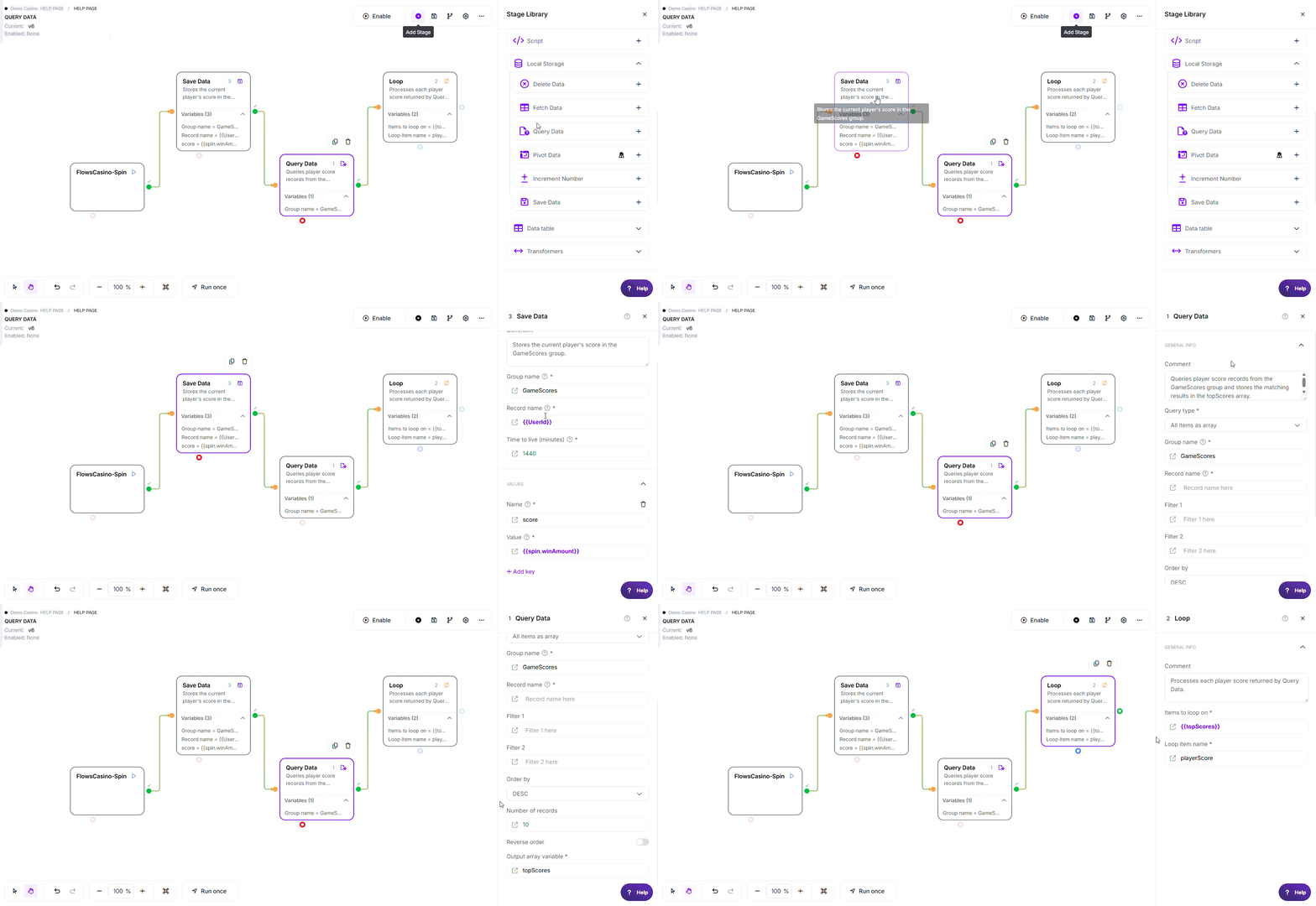
* Example flow demonstrating how a player's spin result is stored using Save Data, retrieved with Query Data, and processed one record at a time using Loop.
Note: The variable names, values, criteria, and configuration used in this example are for demonstration purposes only.
Where to find it: Actions > Local Storage in the stage library.
Configuration
Required Fields
| Field | Description | Example |
|---|---|---|
| Query type | What kind of result to return: a list of records, basic totals, or extended statistics (see Query Types below) | All items as array |
| Group name | The group holding the data to search, matching the group name used when the data was saved | UserScores, {{groupName}} |
| Output variable name | Variable name to store the query results under | topScores, salesStats |
Optional Fields
| Field | Description | Example |
|---|---|---|
| Record name | Narrow the search to records matching this name pattern. Leave blank to search every record in the group. Supports wildcards | user_*, {{recordPattern}} |
| filter1 | Lower bound for value filtering: only include records whose value is greater than or equal to this number. Must be a number or left blank | 70, {{minScore}} |
| filter2 | Upper bound for value filtering: only include records whose value is less than or equal to this number. Must be a number or left blank | 90, {{maxScore}} |
| Order by | Sort direction applied to each record's value before the limit is applied. A direction choice, not a column name: ASC, DESC, or blank | DESC |
| numOfRecords | Maximum number of records to return, applied after sorting | 10, {{limit}} |
| Reverse order | Reverses the final result set after sorting and limiting have already been applied. Only available when Query type is "All items as array" and Number of records has a value | true or false |
Order by is a sort direction only: it always sorts on the record's stored value, so it can't be pointed at a different column.
Using functions in these fields: Any value field above accepts @ functions, for example @NowSecond for the current time or @calc(...) for a calculation.
See Flows Functions for the full list.
Query Types
| Type | Output Variables | Sorting, limits, reverse order |
|---|---|---|
| All items as array | {{variable}}: a list of matching record values | ✓ Apply; the only type these apply to |
| Get sum and count etc | {{variable}}.sum, .count, .average, .minimum, .maximum | ✗ Disabled; there are no individual records to sort |
| Get statistical averages | Everything above, plus .median, .range, .stan_dev, .variance, .q1, .q3, .unique | ✗ Disabled; there are no individual records to sort |
Working With Group Names
| Prefix | Format | Use |
|---|---|---|
| Cache | cache(seconds)::groupName | Reuse results for a set number of seconds instead of querying again each time |
Example: cache(60)::UserScores caches the query's results for 60 seconds.
Exit Points
| Exit | When |
|---|---|
| Pass | The query ran successfully, even if it found zero matching records |
| Error | The query couldn't run: a connection problem, a data type mismatch, or an invalid data source |
How It Works
When executed, the stage:
- Resolves your settings - Fills in the group name, filters, sorting, and query type from your flow's variables, and checks the group name for a data source marker or cache prefix
- Checks the cache - If caching is set up and results are still fresh, returns them without searching again
- Runs the search - Applies filters, sorting, and the record limit
- Builds the result - Returns a list for "All items as array", or calculates the statistics for the other query types, then stores it in cache if caching is set up
- Returns the output variables - Makes the results available to the rest of the flow
Key behavior: Zero matching records always goes to Pass, not Error. Filtering, sorting, and the record limit are all applied before the results are calculated, which keeps large queries efficient.
Common Use Cases
1. Get the Top 10 Scores
- Query type: All items as array, Group name:
GameScores, Order by:DESC, numOfRecords:10
Result: {{topScores}} holds the 10 highest scores, highest first. Add Reverse order true to list them lowest to highest instead.
2. Calculate Sales Totals
- Query type: Get sum and count etc, Group name:
DailySales
Result: {{salesStats}}.sum, .count, .average, .minimum, and .maximum are all populated.
3. Filter by a Value Range, With Caching
- Query type: All items as array, Group name:
cache(30)::TestScores, filter1:70, filter2:90
Result: {{midRangeScores}} holds only the scores between 70 and 90, inclusive. Results are reused from cache for 30 seconds before the group is searched again.
Key Behaviors
| Feature | Behavior |
|---|---|
| Zero results | ✓ Goes to Pass, not Error; returns an empty list, or zeroed-out statistics |
| Filter, sort, and limit order | Filtering and sorting happen first, then the record limit, then Reverse order |
| Caching | ✓ Use a cache(seconds):: prefix on the group name to avoid re-querying |
| Statistics on non-numeric data | ✗ Not supported; "Get sum and count etc" and "Get statistical averages" require numeric values |
| Reverse order on external data sources | ✗ Has no effect when querying an external data source, only your own stored data |
Edge Cases
- Zero results or a group that doesn't exist yet: The query still succeeds; an array query returns an empty list and statistics queries return a count of 0
- Non-numeric values with a statistics query type: Fails with an error explaining the value must be a number
- Limiting or filtering without ordering: Still works, but the result order isn't predictable and may differ between runs
- Very large result sets: There's no built-in paging, so use Number of records to keep results manageable
Error Handling / Troubleshooting
| Issue | Exit | Common Cause | Fix |
|---|---|---|---|
| "Are you trying to add a string to a number?" type error | Error | Running a statistics query type against non-numeric values | Confirm the stored values are numbers, or switch to "All items as array" |
| Results come back in an unpredictable order | Pass | Number of records was set without also setting Order by | Always set Order by when limiting results |
| Cache doesn't seem to apply | Pass | Missing parentheses around the cache duration | Use the format cache(60)::GroupName, with parentheses around the number |
| No results found | Pass | Group name typo, no data saved yet, or filters too narrow | Check the group name matches what was used when saving data, and loosen the filters |
| External data source query fails | Error | The referenced data source ID doesn't exist or isn't accessible | Confirm the data source ID and that it's accessible to your account |
| Expecting Order by to accept a column name | N/A | Configuration carried over from an older habit | Order by is a direction only (ASC/DESC/blank); it always sorts on the record's value |
| Reverse order doesn't seem to do anything | Pass | Querying an external data source, or Number of records isn't set | Reverse order only applies to your own stored data, and only alongside Number of records |
Best Practices
- ✓ Cache frequently repeated queries with a
cache(seconds)::prefix - ✓ Always set Order by when using Number of records, so results are predictable
- ✓ Use filter1 and filter2 instead of fetching everything and filtering later in the flow
- ✓ Pick the right query type: array for records, basic totals for simple aggregates, advanced statistics for deeper analysis
- ✓ Use a Record name pattern to narrow the search when you don't need the whole group
- ✓ Always connect the Error exit so query failures don't stop the flow silently
Related Stages
- Save Data: Creates the data that Query Data searches
- Fetch Data: Simpler retrieval when you already know the exact record
- Delete Data: Remove records found by Query Data
- Loop: Iterate through the list returned by an array query
- Route Flow: Branch based on query results or statistics
- Change Data: Process or transform the query results