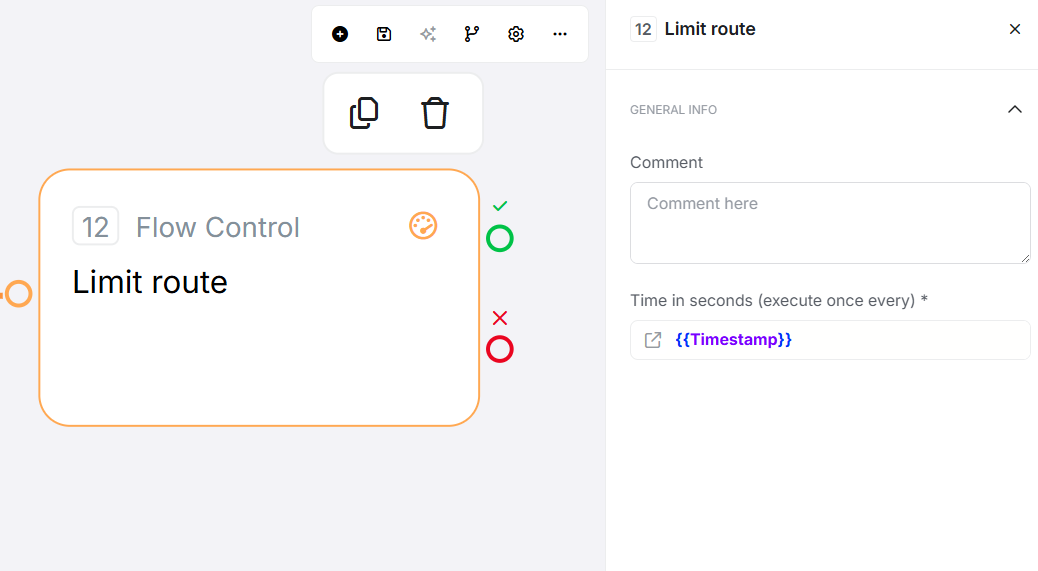
Limit Route controls flow execution rate by allowing execution only once per specified time window. It uses distributed locking to prevent re-execution until the time window expires, making it ideal for rate limiting, preventing duplicates, and throttling operations.
Configuration
Required Fields
Field
Description
Example
Time in Seconds
Number of seconds to lock this route after execution
3600 (1 hour), 300 (5 minutes)
Optional Fields
Limit Name: Custom identifier for this rate limit. If not provided, defaults to stage and flow ID. Use the same Limit Name across different flows to share rate limits. Can include variables for dynamic naming (e.g., email_sent_ {{user}}).
Exit Points
Exit
When
Flow Direction
Pass
Limit not exceeded (first execution or after window expires)
✓ Lock created, flow continues normally
Fail
Limit exceeded (lock exists and hasn't expired)
✗ Routes to alternative handling or error path
How It Works
When executed, Limit Route:
Resolves the limit name - Uses custom name if provided, otherwise defaults to stage and flow ID
Checks for existing lock - Queries distributed storage for active rate limit
Routes based on lock status - If lock exists, routes to Fail; if not, creates lock and routes to Pass
Sets expiration automatically - Lock expires after specified seconds, allowing next execution
Rate Limiting Model: Sliding window that resets from the last successful Pass execution.
Common Use Cases
1. Prevent Duplicate Email Sends
Limit Name: email_sent_{{user}}
Time in Seconds: 3600 (1 hour)
Pass Path: Send Email → End
Fail Path: End (skip email)
Result: Maximum 1 email per hour per user
2. API Rate Limiting
Limit Name: api_call_limit
Time in Seconds: 6 (enforces 10 calls/minute)
Pass Path: Call API → Continue
Fail Path: Return error message
Result: Minimum 6 seconds between API calls
3. User Action Cooldown
Limit Name: reward_claimed_{{user}}
Time in Seconds: 86400 (24 hours)
Pass Path: Save reward to database
Fail Path: Return "Already claimed today"
Result: One reward claim per day per user
4. Shared Rate Limit Across Flows
Limit Name: notification_limit_{{user}} (same in all flows)
Time in Seconds: 3600
Flows: Order confirmations, marketing, system alerts
Result: All flows share same limit, coordinating automatically
5. Debouncing Rapid Triggers
Limit Name: file_process_{{field}}
Time in Seconds: 30
Pass Path: Process file
Fail Path: Ignore rapid changes
Result: Process file once per 30-second window, ignore rapid edits
Key Behaviors
Feature
Behavior
Distributed Execution
✓ Works across multiple servers; limit shared cluster-wide
Workspace Isolation
✓ Limits scoped per workspace; different workspaces independent
Time Precision
1-second precision; no sub-second timing
Window Type
Sliding window; resets from last Pass execution (not fixed boundaries)
Error Handling
Fail-open; if connection errors occur, routes to Pass (allows execution)
Concurrency
Race condition possible; two simultaneous executions might both Pass
Best Practices
✓ Use descriptive Limit Names that clearly indicate what's being limited
✓ Include entity IDs in names for per-entity limits (e.g., {{user}})
✓ Choose appropriate time windows balancing protection and user experience
✓ Always handle the Fail path gracefully with clear user feedback
✓ Test with actual timing to verify limits work as expected
✓ Use the same Limit Name intentionally when coordinating across flows
✓ Log Fail paths to monitor when limits are hit
✓ Combine with other controls (authentication, validation) for security
Common Mistakes
Mistake
Symptom
Fix
Missing variables in Limit Name
Using limit_{{user}} but userId not in flow dictionary
Ensure variables populated before Limit Route stage
Unintended name collision
Different operations share limit by accident
Use specific names with context: action_entity_id
Not handling Fail path
Flow breaks when limit exceeded
Always connect Fail exit with appropriate handling
Expecting exact timing
Assuming millisecond precision
Use second-level granularity, add buffer for critical timing
Using for security
Relying on limit for critical constraints
Combine with database constraints; limit can fail open on errors
Expecting fixed windows
Assuming "top of minute" reset behavior
Understand sliding window model; resets from last Pass
Troubleshooting
Issue
Exit/Result
Common Cause
Fix
Rate limiting not working
Always Pass
Connection errors to distributed storage
Check system health and logs for errors
Unexpected limit collisions
Fail unexpectedly
Same Limit Name used in different contexts
Use more specific names with entity IDs
Two executions both Pass
Both Pass
Race condition on simultaneous execution
Use shorter windows or backend constraints for strict limits
Variable not resolved
Incorrect limiting
Variable in Limit Name empty or undefined
Verify variables exist and have expected values
Edge Cases
Simultaneous executions: Two flows at exact same time might both Pass due to race condition
Connection errors: Routes to Pass (fail-open) when storage unavailable
Very short windows: Minimum 1 second; sub-second not supported
Default Limit Name: Different stages in same flow have different limits; copying stage creates new limit
Variable Limit Names: Empty variables result in names like limit__action
Related Stages
Limit Route Reset: Manually clear rate limit lock before expiration
Route Flow: Conditional branching based on values (vs rate-based branching)
Loop: Iterate with delays (alternative to rapid execution prevention)
Run Later: Schedule delayed execution (vs preventing execution)