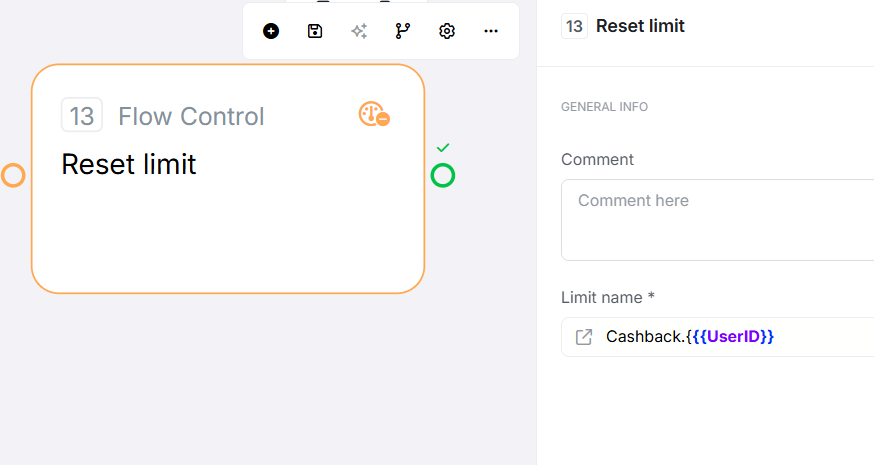
Overview Limit Route Reset manually clears a rate limit lock created by the Limit Route stage, allowing immediate re-execution before the time window expires. It acts as a manual reset button for rate limits.
Configuration Required Fields Field Description Example Limit Name Name of the limit to reset (must match Limit Route stage exactly) email_sent_ {{ UserID }} , api_batch_lock
Exit Points Exit When Flow Direction Pass Always (even if limit doesn't exist) ✓ Reset command executed, flow continues
How It Works When executed, Limit Route Reset:
Resolves the limit name - Gets name from configuration (must match Limit Route exactly)Deletes the lock - Removes rate limit from distributed storage if it existsAlways returns Pass - Idempotent operation; succeeds regardless of whether lock existedImportant: This stage provides no confirmation whether a lock was actually removed. It always succeeds, making it safe to call multiple times.
Common Use Cases 1. Admin Override for User Cooldown Scenario: Users claim reward once per day, admin can resetLimit Name: reward_claimed_{{ UserID }} Flow: Admin verification → Reset → Return Cooldown resetResult: User can claim again immediately2. Reset After Successful Completion Scenario: API batch locked for 5 minutes, reset after completionLimit Name: api_batch_lockFlow: Process batch → Reset lock on successResult: Next batch can start immediately (not waiting remaining time)3. Cancel Operation Clears Lock Scenario: User starts operation, then cancelsLimit Name: operation_{{ UserID }} Flow: Cancel endpoint → Reset → Return CancelledResult: User can start again immediately4. Premium User Bypass Scenario: Free users rate limited, premium users bypassLimit Name: export_{{ UserID }} Flow: Limit Route Fail → Check premium status → Reset → ContinueResult: Premium users never blocked by rate limits5. Conditional Reset After Error Scenario: API rate limit error, retry after clearing lockLimit Name: api_lockFlow: Error 429 → Wait 60s → Reset → RetryResult: Smart retry after rate limit errors6. Scheduled Reset (Nightly Cleanup) Scenario: Reset all user limits at midnightFlow: Scheduler trigger → Loop users → Reset daily_limit_{{ UserID }} Result: Fresh start for new dayKey Behaviors Feature Behavior Exact Name Match Required Must exactly match Limit Route stage's name (case-sensitive) Idempotent Operation ✓ Safe to call multiple times; no error if limit doesn't exist No Confirmation No return value indicating whether lock was actually removed No Undo Once reset, the limit is cleared; cannot restore a cleared limit Immediate Effect Next Limit Route execution will Pass and create new lock Workspace Scoped Can only reset limits within same workspace
Best Practices ✓ Always use explicit Limit Names (don't rely on defaults when using Reset) ✓ Match names exactly between Limit Route and Reset (case-sensitive) ✓ Use same variables in both stages (e.g., {{ UserID }} ) ✓ Verify user permissions before allowing reset (security check) ✓ Log reset actions for audit trail and monitoring ✓ Test reset behavior to verify limit actually clears ✓ Use sparingly - frequent resets defeat purpose of rate limiting ✓ Combine with conditions (reset only when appropriate) ✓ Document use cases explaining when reset is appropriate Common Mistakes Mistake Symptom Fix Using default Limit Names Reset doesn't clear the lock Limit Route and Reset have different stage IDs; use explicit names Typo in Limit Name Lock not reset Copy exact name from Limit Route; use constants or variables Variable name mismatch Different locks cleared Ensure {{userId}} vs {{userID}} matches exactly Expecting confirmation Unclear if reset worked Reset always succeeds; no way to know if lock existed Security oversight Unauthorized users reset limits Add authorization checks before reset stage Resetting too frequently Rate limiting ineffective Review reset conditions; ensure they're exceptional cases
Troubleshooting Issue Exit/Result Common Cause Fix Reset doesn't clear limit Pass (but no effect) Limit Name doesn't match Limit Route exactly Verify spelling and variable names match exactly Wrong limit cleared Pass Variables resolve to different values Ensure variables have same values in both stages No effect on other flows Pass Different Limit Names or workspace Use same Limit Name across flows to share limits Reset fails silently Pass Connection errors to distributed storage Check system logs for errors
Edge Cases Resetting non-existent limit: Succeeds with no effect; no error thrownResetting expired limit: Lock already gone; reset has no effectWrong Limit Name: Silently succeeds; check spelling and variablesReset before Limit Route: No effect; next Limit Route still creates lockMultiple resets: Safe and idempotent; subsequent calls do nothingVariable mismatch: {{ userID }} vs {{ UserID }} create different keys Default Limit Name issue: Limit Route and Reset have different stage IDs, won't matchRelated Stages Limit Route: Creates the rate limit lock that this stage resetsRoute Flow: Add conditions before resettingLoop: Reset multiple limits in batch