
Add To Response (Dynamic)
Overview
Add To Response (Dynamic) adds dynamic key-value pairs to the flow's response payload. Unlike Add To Response (Fixed), dynamic values are re-evaluated at response time, reflecting the current state of flow variables when the response is generated. Use this stage when you need response fields to reflect the final state of variables after all flow modifications.
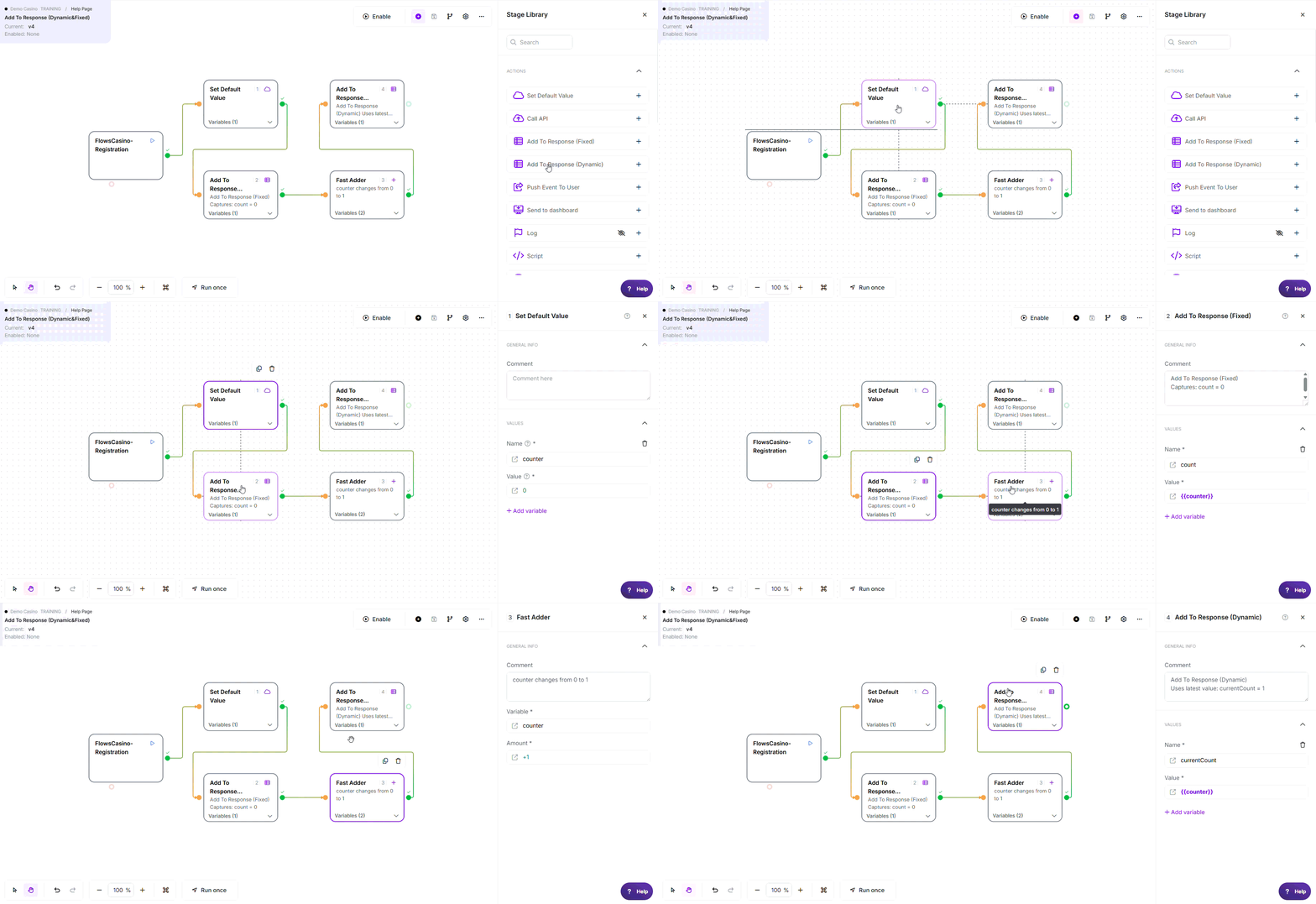
* This example demonstrates how Add To Response (Dynamic) always returns the latest value of the variable. After counter is increased by the Fast Adder stage, the response returns currentCount = 1.
Note: The variable names, values, criteria, and configuration used in this example are for demonstration purposes only.
Where to find it: Actions in the stage library.
Configuration
Required Fields
| Field | Description | Example |
|---|---|---|
| Name (Response Key) | Key name in response (plain text, no {{}}) | currentCount, finalStatus, itemsProcessed |
| Value (Response Value) | Variable reference to include (evaluated at response time) | {{counter}}, {{status}}, {{totalItems}} |
Using functions in these fields: Any value field above accepts @ functions, for example @NowSecond for the current time or @calc(...) for a calculation.
See Flows Functions for the full list.
All Dynamic values are returned as text. When the response is built, each value is read as a string, so a number comes back as text (1 becomes "1"), a missing or empty variable becomes an empty text value (""), not a JSON null, and a value starting with = is calculated at response time but its result is still returned as text. If you need a value returned as an actual number, use Add To Response (Fixed) with a number-type field or an = formula instead.
Fixed vs Dynamic
| Aspect | Fixed | Dynamic (This Stage) |
|---|---|---|
| When Evaluated | At stage execution time | At response use time |
| Value Snapshot | Frozen when stage runs | Updates with flow state |
| Variable Changes | Not reflected in response | Reflected in response |
| Use Case | Static metadata | Dynamic current state |
Example: Difference in Action
Flow: 1. Set Default Value: counter = 0 2. Add To Response (Fixed): count → {{counter}} → Snapshot: "count": 0 3. Fast Adder: counter + 1 (now counter = 1) 4. Add To Response (Dynamic): currentCount → {{counter}} → Dynamic: "currentCount": 1 Response: "count": 0 (Fixed - unchanged) "currentCount": 1 (Dynamic - updated)
Exit Points
| Exit | When |
|---|---|
| Pass | Always (stage cannot fail) |
How It Works
When executed, the stage:
- Receives execution - Stage runs at any point in flow
- Stores field references - Preserves dynamic binding (not snapshots)
- Adds to response payload - Fields reference variables, not fixed values
- Re-evaluates on use - Values reflect current variable state at response time
Key behavior: Dynamic binding means values change if variables update after this stage runs. Values are not frozen - they reflect the final state of variables when the response is consumed.
Common Use Cases
1. Track Variable Evolution
Include variables that change throughout the flow.
Configuration:
itemsProcessed→{{totalItems}}avgProcessTime→{{totalTime}}
Result: Response reflects final values after all flow modifications complete.
2. Conditional Response Values
Add different values based on flow branches.
Pass branch:
success→{{successCount}}
Fail branch:
error→{{errorMessage}}
Result: Response reflects branch-specific values at time of use.
3. Mixed Fixed and Dynamic
Combine immutable metadata with dynamic values.
Add To Response (Fixed):
timestamp→{{processedAt}}version→2.0
Add To Response (Dynamic):
itemsProcessed→{{totalItems}}avgProcessTime→{{totalTime}}
Result: Response mixes immutable (timestamp, version) with dynamic values.
Best Practices
- ✓ Use for values that change throughout the flow
- ✓ Place after all variable modifications to capture final state
- ✓ Combine with Fixed responses for mixed needs (metadata vs dynamic)
- ✓ Initialize variables explicitly with Set Default Value first
- ✓ Document which fields are dynamic in Comments stage
- ✓ Test with variable modifications to verify values update correctly
Common Mistakes
| Mistake | Symptom | Fix |
|---|---|---|
| Not understanding re-evaluation | Unexpected values in response | Dynamic values change if variables updated after stage |
| Using Fixed when Dynamic needed | Values don't reflect final state | Use Dynamic for values that change during flow |
| Uninitialized variables | Empty/null values in response | Initialize with Set Default Value before Add To Response |
| Assuming immutability | Values change unexpectedly | Unlike Fixed, Dynamic values are not snapshots |
Troubleshooting
| Issue | Common Cause | Fix |
|---|---|---|
| Value not in response | Key or value misconfigured | Verify both key and value are non-empty |
| Value is wrong/unexpected | Variable modified since stage execution | Trace variable modifications to understand final state |
| Empty/null value in response | Variable uninitialized at response time | Initialize variable with Set Default Value earlier |
| Response structure inconsistent | Dynamic variables sometimes missing | Initialize all potential response fields |
| Cannot predict response value | Too much variable modification | Add Debug Stage to track variable state |
Do's and Don'ts
Do:
- ✓ Use for values that change throughout the flow
- ✓ Use variable references:
{{userId}} - ✓ Use when you want final state of variables in response
- ✓ Place after all variable modifications
- ✓ Combine with Fixed responses for mixed needs
Don't:
- ✗ Use when values should be immutable (use Fixed instead)
- ✗ Use {{}} in key names (plain text only)
- ✗ Forget that values are evaluated at response time, not stage time
- ✗ Assume values are frozen after stage execution
Edge Cases
- Variable not yet initialized: the reference resolves to an empty text value (
""), not a JSON null - Variable modified after stage: Dynamic values reflect latest state
- Multiple references to same variable: All reflect current value
- Missing or empty variable: comes back as empty text (
""), never as a null - Value type: every Dynamic value is returned as text, including numbers and formula results
Related Stages
- Add To Response (Fixed): Capture response values when the stage runs.
- Return True: Return a successful completion result.
- Return False: Return a false completion result.
- Change Data: Update variables before the response is generated.
- Set Default Value: Initialize optional variables before using them.